This is a project a few art and design members at Young Horses used to learn Unreal Engine 5. I was already familiar with Unreal so I used this project to develop the studio's documentation for UE5, learn some of the quirks of the engine, define our workflow with third party software, get more practice with UE materials and learn some VFX. If you would like to play this game you can play it on Steam for free! We started this project in August 2022 and I left the project at the end of January 2023.
For this project, I was responsible for about 80% of the models and textures, most VFX, UI graphics, most documentation, I had a significant role in developing and research for the art style . I was hands on in the design meetings and making several suggestions that were worked into the game.
The software I used:
Substance Painter, Substance Designer, Marvelous Designer, Zbrush, Maya, Photoshop, Unreal Engine 5, Procreate, and our version control was SVN.

IndependANT
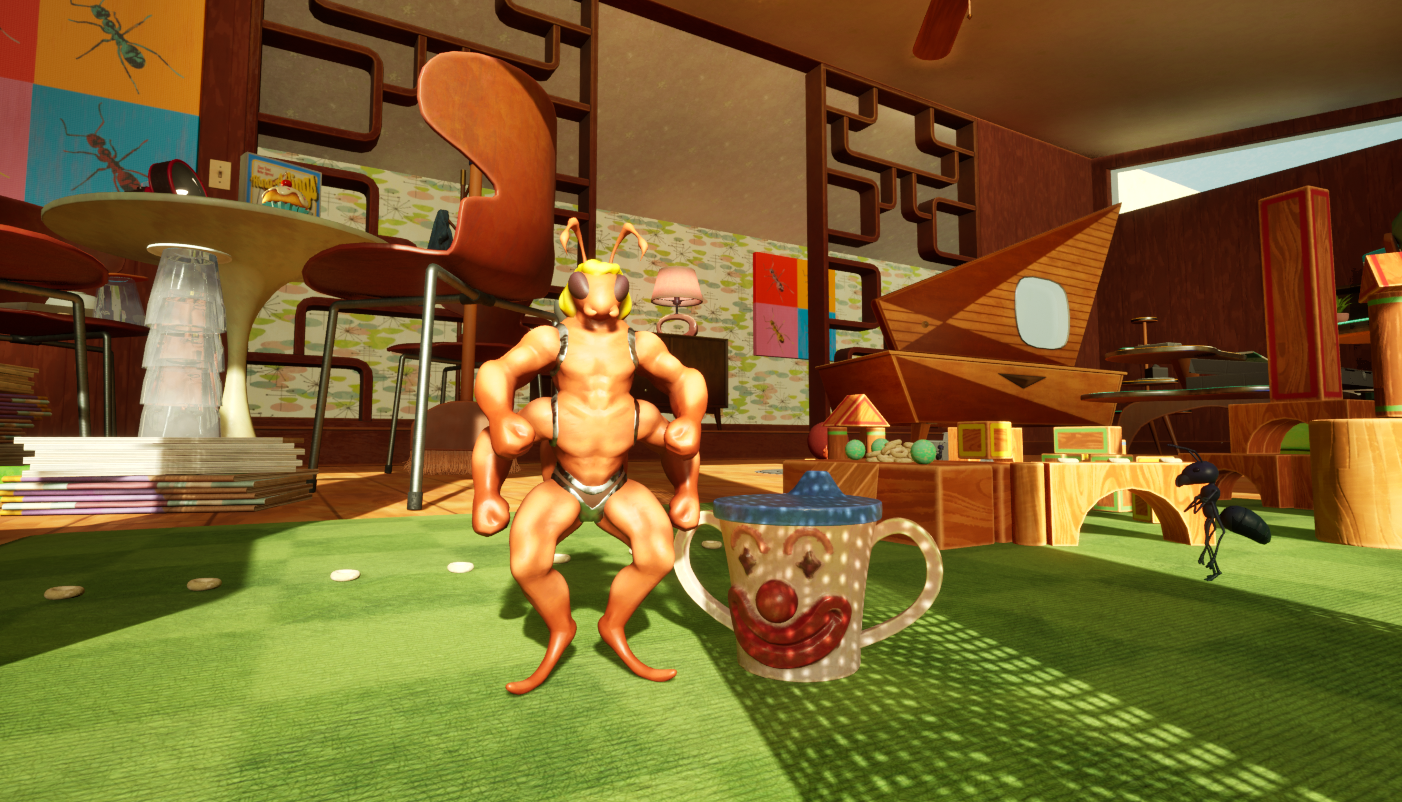
Here are a few close up images with mine and my coworkers work.
In the following images I am responsible for all aspects except:
The plants, playing cards, magazines, clock, TV, ant character models, lamp, credenza, string lights, fence, light switch, and book shelf.



In the next few images have only my contributions.


The couch asset was the first asset we chose to complete fully and use as a base for the style. This process took a few weeks but we settled on a style that incorporated broad brush strokes in the normal map. I also used this time to help get one of my coworkers up to speed with Substance Painter by giving them this asset to practice on and work through best practices in Painter. Through creating assets I encouraged my colleague to create smart materials to speed up the texturing process for future assets.
I also defined our export options which were the Targa file format and our naming conventions: T_CouchFabric_D and T_CouchWood_D (_MRAO, _N, and _H if used) as this asset used two 4k textures and two materials with the diffuse and MRAO maps downsized in UE5 later.
Here is a breakdown image of the couch asset.

Here are a few patterns I created in Substance Designer. These materials are able to blend into another using height maps and vertex painting on the walls and floors.

As for UI and VFX, I used a number of techniques and software/plugins. The UI elements were created in Photoshop and the VFX were using a combination of UE Chaos, Zbrush, Maya, Niagara, and Cascade. I am not someone who is well versed in VFX but I am willing to give these things a try. I think these show a great example of some placeholder assets that can be updated later, some may even be used as final assets with a bit of tweaking.
VFX - Chaos and Flipbooks
The broken ant farm was modeled whole and broken using UE5's Chaos system. I was then able to export the results where I cleaned up the model in Zbrush and Maya, separated out the materials, and made UVs in Maya. I also used this to make the cereal pile.

For the fire and foot step/fall poofs I used the UE asset store tool FluidNinja by Andras Ketzer.
This tool allows you to create stylized smoke sims that you can export as PNGs. I took the exported images into photoshop where I used a contour filter. I then exported them to Procreate to create the linework, I used Procreate because the brush - Baskerville has much better smoothing and lazy mouse controls then Photoshop. After creating the lines I reimported it back into Photoshop where I colored them in. On a new layer I added shading then used the filter Halftone on to create the printed halftone effect. Once this is complete I put it into Unreal where I created a material to play the flipbook animation.
For the footsteps and fall poofs, I used Cascade to generate the mesh and attached the particle to the animation using an Anim Notify. The process was the same otherwise.


UI
The UI is simple and my current priority along with the VFX. I did a few iterations on this before settling on a UPA style vs. a comic book style. I still need to do some work with the placement of the UI elements so all words fit neatly inside the boxes.

Documentation
If you would like to take a look at the development documentation I created for this project you can see that here:
https://drive.google.com/file/d/1CnHAYE5CZPts6lP_ABszWo_hgE3w6kAE/view?usp=sharing
This is a PDF I created to assist on the development of this project. I have redacted contributions that were not mine or contain sensitive information. This details the thought process on some of the art direction, how to create models and textures for this project, quirks of Unreal 5, naming conventions, etc.
Gameplay
The plot of this classic platformer is of an ant who is searching for food for the colony after their ant farm was broken. The owners of the home are obsessed with ants as you can see many ant themed artworks around the home. We chose to place this around the 1960s and use mid century modernism as a base with heavy inspirations from UPA revival cartoons such as My Life as a Teenage Robot, Powerpuff Girls, Rocko's Modern Life, The Incredibles, etc. You can find gameplay footage at the bottom of the page.
Below is a video of gameplay and the current state this small game is in and all of the hard work we have put into it.
Thank you for reading through this. I am happy to answer any questions or provide additional information on this project. I hope you enjoyed my breakdown of this game.